📣 Now you can record an Offline refund from E-Wallet 💸
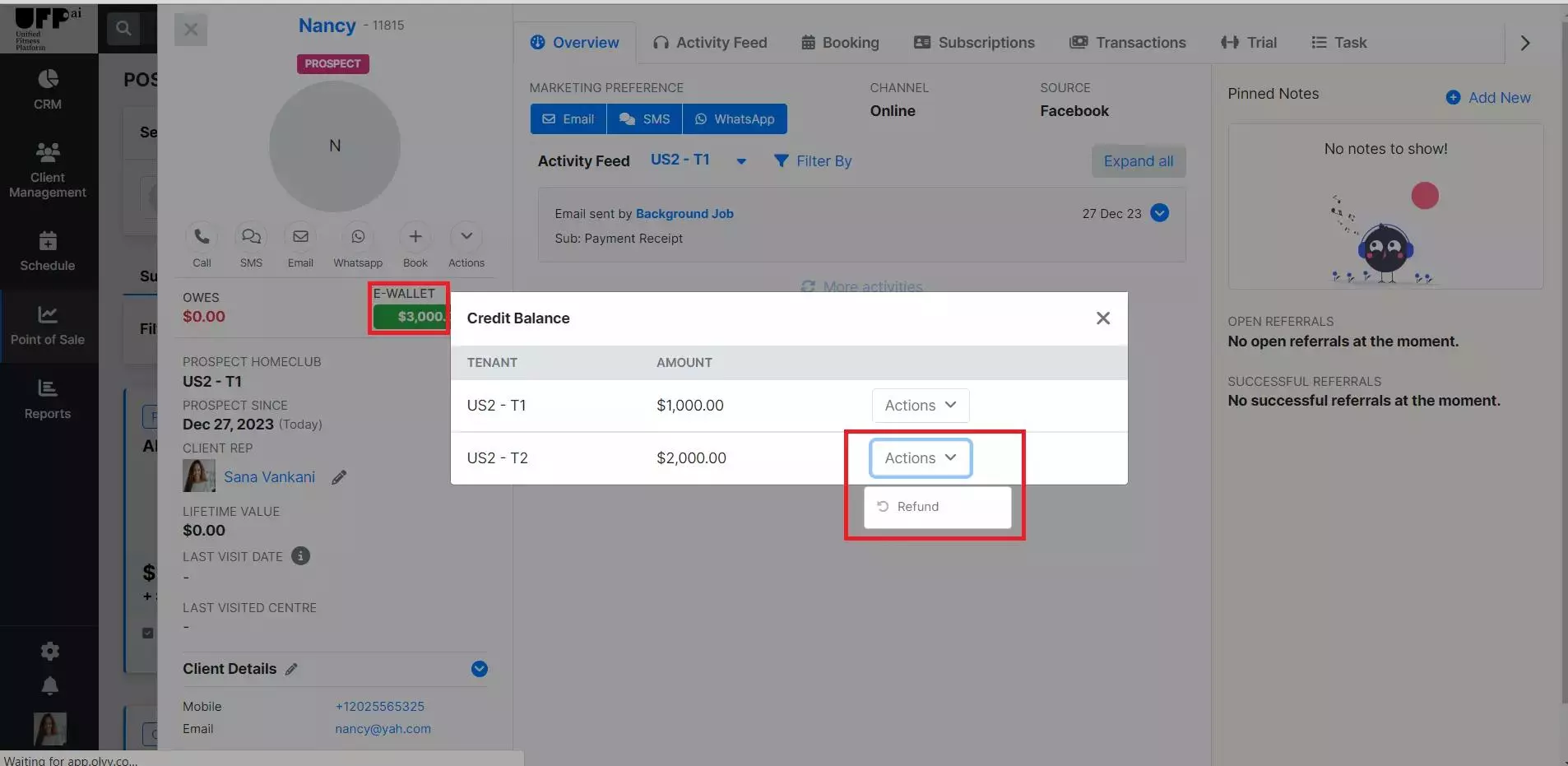
We're thrilled to bring you another exciting update to our platform – Record an offline E-wallet refund ! Now, managing refunds is more straightforward than ever. Here's a quick guide on how to initiate an E-Wallet refund:
How to Initiate an E-Wallet Refund:
Go to the client's profile page:
Start by navigating to the client's profile page within the platform.
Navigate to the E-wallet section:
Once on the client's profile page, locate the E-wallet section. Clicking on the E-wallet will reveal a pop-up with information about the client's E-wallet balance.
Click on the "Refund" option:
On the E-wallet information pop-uo, you'll notice a "Refund" option under the actions button. Click on this option to initiate the refund process.
Complete the refund process:
Record the offline payment mode you used to refund and record the transaction.
Note:
Ensure that you have the necessary permissions to initiate refunds.
Verify that the client's E-wallet has sufficient funds for the refund to be processed successfully.
This new feature is designed to streamline your workflow, making the refund process quick and user-friendly
#UFP#EWalletRefundEase 💸🎉