How do I assign or change a KeyFOB for a member?
Short Answer
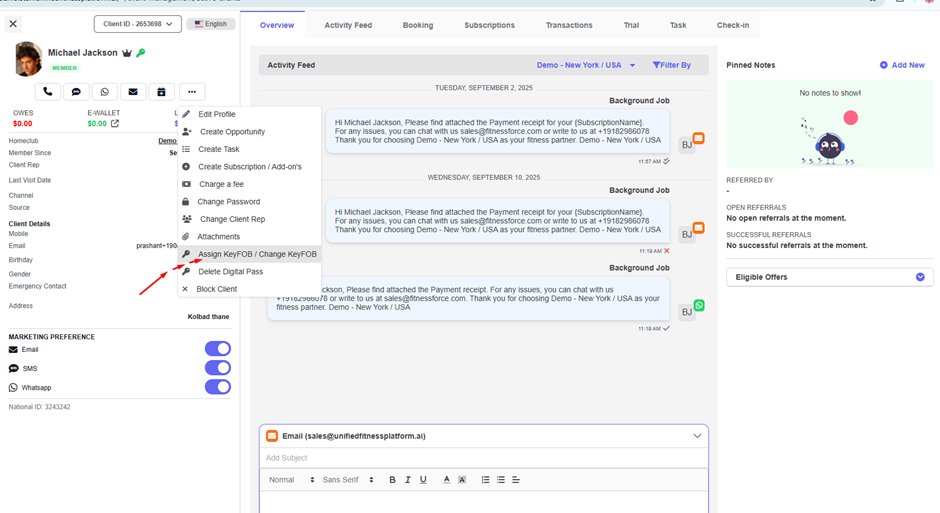
You can assign a new KeyFOB or change an existing one directly from a member’s profile. Just search for the member, go to Assign KeyFOB / Change KeyFOB, enter the KeyFOB number, and click Assign.
Detailed Steps
To Assign a New KeyFOB
Search for the member in the OmniSearch bar.
Open the profile and go to Assign KeyFOB / Change KeyFOB.
Enter the new KeyFOB number.
Click Assign to link the KeyFOB to the member.
To Change an Existing KeyFOB
Search for the member in the OmniSearch bar.
Open the profile and go to Assign KeyFOB / Change KeyFOB.
Enter the replacement KeyFOB number.
Click Assign to update the profile with the new KeyFOB.
FAQ
Q: Can I assign a KeyFOB without a member profile?
No, a KeyFOB must always be linked to an existing profile in the system.
Q: What happens to the old KeyFOB when I change it?
The old KeyFOB will be deactivated and replaced by the new one.
Q: Can two members share the same KeyFOB?
No, each KeyFOB is unique and can only be linked to a single profile.
Q: How soon will the new KeyFOB work after assignment?
Immediately—once assigned, the member can use it right away for access.